Skip to content

Changelog

Latest updates and improvements in the new feature category.

Follow us on X

All changelog posts

  • Rich chat editor for workflow Chat steps

    Build structured chat notifications with text, images, lists, link buttons, variables, and provider-aware previews from the workflow editor.

    Authors:
    Paweł TymczukVictor Yakubu
    Paweł T., Victor Y.
    Rich chat editor for workflow Chat steps

    Workflow Chat steps now include a visual block editor. Instead of limiting every workflow-sent chat notification to one text body, you can compose structured messages for approvals, reports, summaries, prompts, and calls to action from the Dashboard.

    Novu converts the shared message into a provider-specific format at delivery time. You author the content once, then inspect how it may appear on each chat provider connected to the environment.

    Rich chat editor

    Build structured Chat steps visually

    Type / or use the add control to insert blocks into a Chat step. The first release supports:

    • Text and images.
    • Dividers, blockquotes, hard breaks, and numbered or bulleted lists.
    • Link buttons with variable-backed labels and redirect URLs.
    • Repeat and Digest blocks for content produced by earlier workflow steps.

    Dashboard buttons open a URL. They do not route a reply to an agent or call back into your application.

    Preview each provider before publishing

    The preview panel uses the same shared card model as delivery. Switch between providers configured in the current environment to inspect an approximate rendering for each one.

    Novu maps the card into provider-specific formats for Slack, Microsoft Teams, Telegram, and WhatsApp. Providers without a matching rich layout receive a compatible Markdown or text representation. When a provider cannot represent a block or button fully, the preview shows a compatibility warning so you can simplify the message or add a provider content override.

    Provider previews are approximate. The delivered message can still differ because each platform controls its own spacing, layout, and supported features.

    Existing text workflows keep their behavior

    Existing Chat steps that use plain text or Liquid continue to use the Text editor and deliver as before. New empty Chat steps open in the Block editor by default.

    You can switch between the Block and Text editors, but changing modes replaces the content stored for the current mode. Copy any content you need before switching while editing an existing workflow.

    Liquid variables and translations continue to work. Use the Text editor for templates that depend heavily on Liquid conditions or loops. Use the Block editor when the message benefits from a structured layout that can be shared across providers.

    Return the same card model from Framework

    Code-first workflows can return a card from step.chat() instead of a text-only body:

    Return the same card model from Framework
    import { Actions, Card, CardText, Divider } from '@novu/framework';
    
    await step.chat('deploy-complete', async () => ({
      card: Card({
        title: 'Deploy complete',
        children: [
          CardText('All checks passed.'),
          Divider(),
          Actions([
            {
              type: 'link-button',
              id: 'view-deploy',
              label: 'View deploy',
              url: 'https://example.com/deploys/123',
            },
          ]),
        ],
      }),
    }));

    Existing body returns remain valid. When a Chat step returns both body and card, Novu uses the card.

    Add provider-native JSON when the shared card is not enough

    The block editor covers shared rich content. Provider content overrides remain available beside Default content when you need exact provider JSON, such as a full Slack Block Kit payload or a WhatsApp template.

    Read how to write Chat templates in the Dashboard or see the Framework Chat step for code-first workflows.

  • Tool steps for on-call services and webhooks

    Send workflow notifications to subscriber-specific PagerDuty, Opsgenie, Grafana IRM/OnCall, or custom HTTP endpoints through a first-class Tool channel.

    Authors:
    George DjabarovVictor Yakubu
    George D., Victor Y.
    Tool channel steps for on-call services and webhooks

    Tool is now a first-class channel in Novu workflows, alongside Email, SMS, Chat, and Push. Add a Tool step when a notification needs to create an on-call alert or reach an HTTP endpoint instead of a person-facing messaging channel.

    The first Tool providers are PagerDuty, Opsgenie, Grafana, and Tool Webhook.

    Tool channel step

    Route alerts to each subscriber's on-call service

    PagerDuty, Opsgenie, and Grafana use subscriber-specific channel endpoints. Each subscriber can connect a PagerDuty service, an Opsgenie account or team, or a Grafana IRM/OnCall stack. A single workflow then resolves the matching destination for each subscriber at delivery time.

    This supports products whose customers need alerts delivered to their own on-call systems. Your application collects the destination credential or webhook URL and registers it through the channel endpoints API. You do not need a separate provider integration or routing implementation for every customer.

    If a subscriber has no endpoint for the selected provider, Novu marks the Tool step as skipped for that subscriber. Other subscribers in the same trigger are unaffected.

    Send to shared or customer-defined HTTP endpoints

    Tool Webhook covers destinations that do not have a native Tool provider. It supports two routing modes:

    • Static: Configure one shared endpoint on the integration. Every delivery goes to that URL.
    • Dynamic: Register one or more tool_webhook endpoints for each subscriber. Novu sends the Tool step to every endpoint registered for that subscriber.

    Dynamic endpoints can define their own URL, headers, and POST, PUT, or PATCH method. This gives each subscriber control over where their notifications go without hardcoding those destinations in your workflow.

    Shape, sign, and inspect webhook deliveries

    Tool Webhook lets you configure the outbound JSON without replacing the content authored in the workflow. Novu builds the request from the integration-level JSON body, the rendered Tool step content, and step overrides. The rendered step content is always sent as content and wins if the integration body defines the same key.

    You can set a signing secret to add an HMAC-SHA256 digest in the X-Novu-Signature header. The receiving server can verify the signature against the raw request body before processing the delivery.

    Novu handles delivery retries and records the result in Activity, so you can inspect the workflow run, delivery status, and attempts without maintaining a separate webhook delivery system.

    To use the new channel:

    1. In the Integrations Store, select Connect Provider, open the Tool tab, and choose a provider.
    2. Add a Tool step to a workflow and write its content with the same Liquid variables available to other workflow steps.
    3. For subscriber-specific routing, register each destination through the channel endpoints API from your backend.
    4. Trigger the workflow as usual. Novu resolves the destination, delivers the Tool step, and records the result in Activity.

    Read the setup guides for PagerDuty, Opsgenie, Grafana, and Tool Webhook.

  • LangChain adapter for Novu Connect

    Connect a LangChain or LangGraph agent to Slack, Microsoft Teams, WhatsApp, Telegram, and email, with mapped conversation history and in-channel tool approval on the adapter-managed path.

    Langchain adapter for Novu Connect

    The LangChain adapter is now available through @novu/framework/langchain. It gives teams already using LangChain or LangGraph a direct path to Novu Connect without rebuilding their agent for each communication channel.

    Your agent or graph continues to run in your application. Novu Connect handles inbound channel events, conversation context, and delivery of the response back to the user.

    For OpenAI:

    npm install @novu/framework langchain @langchain/core @langchain/openai

    For Anthropic:

    npm install @novu/framework langchain @langchain/core @langchain/anthropic
    Good to know

    This is not limited to just OpenAI and Anthropic, you can use other LangChain provider keys.

    Return a config or invoke your own agent

    The adapter supports two handoff patterns based on how much of your LangChain setup you want it to manage.

    When you return a LangChainAgentConfig from onMessage, the adapter calls createAgent().invoke() in your application, maps ctx.history, and delivers the final assistant response:

    import { agent } from '@novu/framework/langchain';
    
    export const supportBot = agent('support-bot', {
      onMessage: async (_message, ctx) => ({
        model: 'openai:gpt-4o',
        system: 'You are a helpful support agent.',
      }),
    });

    If you already invoke a LangChain agent or LangGraph graph yourself, use toLangChainMessages(ctx.history), run your existing invoke() call, and return { messages }. Novu delivers the final assistant message. Tool approval is not managed by the adapter on this bring-your-own invocation path.

    Ask for approval in the channel

    On the config path, needsApproval lets you gate sensitive tools without building a separate approval flow for every channel. When the model calls a gated tool, Novu posts an Approve / Deny card and pauses the turn. After the user responds, the adapter replays the approval cycle from conversation history and continues the agent run.

    import { tool } from '@langchain/core/tools';
    import { agent } from '@novu/framework/langchain';
    import { z } from 'zod';
    
    const issueRefund = tool(
      async ({ orderId }) => ({ orderId, status: 'refunded' }),
      {
        name: 'issueRefund',
        description: 'Issue a refund for an order',
        schema: z.object({ orderId: z.string() }),
      },
    );
    
    export const supportBot = agent('support-bot', {
      onMessage: async () => ({
        model: 'openai:gpt-4o',
        system: 'You are a helpful support agent.',
        tools: [issueRefund],
        needsApproval: (toolCall) => toolCall.name === 'issueRefund',
      }),
    });

    This approval flow does not require a separate LangGraph checkpointer. The conversation history holds the information the adapter needs to resume the turn.

    Get started with npx novu connect --runtime langchain, then follow the LangChain quickstart. See the LangChain reference for config returns, custom invocation, approval gating, Next.js setup, and error handling.

  • Vercel AI SDK adapter for Novu Connect

    Bring an existing Vercel AI SDK agent to Slack, Microsoft Teams, WhatsApp, Telegram, and email while keeping the same model, tools, and application code.

    Vercel AI SDK adapter for Novu Connect

    The Vercel AI SDK adapter is now available through @novu/framework/ai-sdk. Your agent continues to run your application. Novu Connect receives messages from each connected channel, passes the conversation context to your handler, and delivers the response that your handler returns.

    Install @novu/framework with the AI SDK and your model provider:

    npm install @novu/framework ai @ai-sdk/openai

    Use one handler across connected channels

    Return generateText() from onMessage, and the adapter handles the handoff between Novu conversation history and the Vercel AI SDK.

    import { agent, toModelMessages } from '@novu/framework/ai-sdk';
    import { openai } from '@ai-sdk/openai';
    import { generateText } from 'ai';
    
    export const supportBot = agent('support-bot', {
      onMessage: async (_message, ctx) =>
        generateText({
          model: openai('gpt-4o'),
          instructions: 'You are a helpful support agent.',
          messages: toModelMessages(ctx.history),
        }),
    });

    toModelMessages(ctx.history) converts the full conversation into AI SDK messages and already includes the current inbound message. After you connect other channel providers, the same handler can reply on Slack, Microsoft Teams, WhatsApp, Telegram, and email.

    Keep tool approval in the conversation

    AI SDK tool loops work through the adapter, including actions and tool calls that require a person to approve them. Set needsApproval: true on a tool, and Novu posts an Approve / Deny card in the conversation any time the tool is called. The turn pauses until the user decides, then resumes with the decision included in the mapped conversation history.

    import { agent, toModelMessages } from '@novu/framework/ai-sdk';
    import { openai } from '@ai-sdk/openai';
    import { generateText, tool } from 'ai';
    import { z } from 'zod';
    
    export const supportBot = agent('support-bot', {
      onMessage: async (_message, ctx) =>
        generateText({
          model: openai('gpt-4o'),
          messages: toModelMessages(ctx.history),
          tools: {
            issueRefund: tool({
              inputSchema: z.object({ orderId: z.string() }),
              needsApproval: true,
              execute: async ({ orderId }) => refund(orderId),
            }),
          },
        }),
    });

    You can also use MCP tools through the AI SDK MCP client on the custom-code path. Your application creates the client and supplies its credentials, while Novu Connect handles the conversation and channel delivery.

    Get started with npx novu connect --runtime ai-sdk, then follow the AI SDK quickstart. See the AI SDK reference for return types, tool approval, MCP tools, streaming updates, and error handling.

  • Improved code workflows preview

    Preview code-first workflows live from your local bridge, right inside the dashboard. novu dev now opens a Local environment instead of the legacy local Studio.

    Author:Dima Grossman
    Dima Grossman

    The dashboard now has a Local environment mode that replaces the legacy local Studio. It gives you a code-first workspace to preview and iterate on your workflows live.

    One command

    Run the CLI in your project and Novu tunnels your local bridge app, then opens the dashboard on the Local environment via a secure handshake.

    npx novu dev

    Your locally defined workflows show up in the dashboard instantly, so you can review steps, payloads and previews against your real code as you edit. Syncing workflows to dev and production flows are left unchanged.

  • Subscriber Credentials Drawer

    Manage every subscriber's delivery credentials from one drawer in the dashboard.

    Author:Paweł Tymczuk
    Paweł Tymczuk
    Credential Management UI

    You can now view and manage all of a subscriber's delivery credentials right from the dashboard. Open any subscriber, switch to the new Credentials tab, and every channel they can be reached on is in one place — no more round-trips to the API to check why a push or chat message didn't land.

    Grouped by channel

    Credentials are organized by channel — Email, SMS, Push and Chat — with a card per connected integration. Push lists each device token, Chat shows webhooks and endpoints for Slack, Microsoft Teams, Telegram, WhatsApp and more. Values are masked by default, with a toggle to reveal them and one-click copy.

    Add and edit credentials inline

    Add credentials without leaving the dashboard. Append push device tokens, or add chat endpoints per provider — a Slack channel or user, a Teams channel or user, a Telegram chat, or a plain webhook URL. Editing and deleting are inline too, so fixing a stale token is a two-click job.

    For Slack, Microsoft Teams and Telegram, generate a per-subscriber connect link and share it. Your subscriber completes the OAuth or Telegram linking on their own — no dashboard access required — and the credential lands back on their profile automatically.

    Prefer automation? Everything here is still available via the API read the subscriber credentials docs.

    Telegram Connect Components

    Telegram connect flow in the SDKs @novu/js and @novu/react now expose the Telegram subscriber-link onboarding (deep link/QR, connection polling and expiry handling) so you don't have to build it yourself. Read More

    Improvements (8)
    • Actor variables in the workflow editor — use {{actor.firstName}}, {{actor.email}}, {{actor.subscriberId}} and more directly in step content on the new dashboard.

    • Ask AI now opens the docs assistant — the Command-K “Ask AI” action takes you straight to the Novu docs assistant for better answers.

    • Contexts is out of beta — the Contexts page is now generally available.

    • CLI connect matches the dashboard — npx novu connect now mirrors the dashboard's runtime grouping, and --runtime ai-sdk scaffolds a real AI SDK project.

    • Smoother agent channel onboarding — the channel picker opens on the first click, copy was standardized to “channel,” and connected agents get a guided “What's next” section.

    • Cleaner agent conversation timeline — managed and self-hosted agents now show the same flat, human-readable audit trail.

    • Zero-downtime API key rotation — create a second secret key, migrate your apps over, then delete the old one — rotate keys without any downtime.

    • Microsoft Teams multi-tenant distribution — distribute your Teams agent across tenants, with a Teams-specific subscriber-rollout onboarding guide.

    Fixes (9)
    • Workflow editor — switching to the HTTP request step via the breadcrumb no longer crashes the page.

    • Digest — monthly digests with valid days are no longer incorrectly rejected.

    • Workflows — the worker no longer crashes on legacy IN / NOT_IN step filters (common with webhook-based conditions).

    • Email — new-dashboard workflows using an email step with an email-webhook integration now send the content field instead of an empty body.

    • Inbox — the unread badge stays in sync after mark-as-read and mark-all-as-read, and sub-minute timestamps like “Just now” are now localized.

    • Inbox integration — clicking a production In-App integration card opens its config drawer (with the HMAC toggle) instead of the onboarding wizard, and the signed-out inbox embed link now redirects to sign in instead of showing a blank screen.

    • SendGrid — activity tracking captures every event when SendGrid batches them, fixing missing or duplicate message.seen / message.delivered events and outbound webhooks.

    • SMS — the AfricasTalking provider works again after a fix to its provider id.

    • Self-hosted email — custom-domain email delivery and inbound mail replies work on self-hosted enterprise.

  • Novu Chat SDK Adapter

    Bring your Chat SDK agent to Slack, Teams, WhatsApp, Telegram, and email: deliver multi-channel notifications from one trigger, resolve every channel to one unified subscriber, and drop in React connect components to put channels in front of your end-customers.

    The @novu/chat-sdk-adapter is now available. Wire it into your Chat SDK app and Novu manages credentials, identity, and delivery across Slack, Microsoft Teams, WhatsApp, Telegram, and email.

    npm install @novu/chat-sdk-adapter

    Multi-channel notifications from one trigger

    Define a workflow once in Novu with the channels you want, then fire a single trigger from any handler. Novu fans out to every step — Slack, email, WhatsApp, and more — and routes replies back through the same agent loop, so proactive notifications and conversational replies share one handler set.

    const ctx = getNovuContext(thread);
    
    // One trigger delivers to every channel in the workflow.
    await ctx.trigger("order-shipped", {
      payload: { orderId: "1234", trackingUrl: "https://example.com/track/1234" },
    });

    One unified subscriber across every channel

    Every channel resolves to a single Novu subscriber mapped to your own user, so your agent always knows who it's talking to — with email, phone, locale, custom data, and the canonical conversation history available inside any handler.

    const ctx = getNovuContext(thread);
    
    const subscriber = await ctx.getSubscriber(); // email, phone, locale, custom data
    const history = await ctx.getHistory();       // canonical transcript — ideal for LLM context

    Expose channels to end-customers with connect components

    Drop the prebuilt SlackConnectButton from @novu/react into your app so your end-customers can install and connect their own Slack workspace to your agent — OAuth, credentials, and Slack Connect handled by Novu. Microsoft Teams and Telegram connect buttons are in pre-release.

    import { SlackConnectButton } from '@novu/react';
    
    <SlackConnectButton
      integrationIdentifier={integrationIdentifier}
      connectionIdentifier={`${subscriberId}:${integrationIdentifier}:${agent.identifier}`}
      connectionMode="subscriber"
      connectLabel={`Install ${agent.name} ↗`}
      connectedLabel="Connected to Slack"
      onConnectSuccess={handleSlackOAuthSuccess}
    />

    Get started with npx novu connect --runtime chat-sdk, or read the connect components docs.

  • <Subscription /> component

    Give users control over what notifications they receive - at the topic level. Create subscribe/unsubscribe flows that fit the context. Set workflow preferences and use advanced conditional rules. All of this can be done with a customizable React component.

    Authors:
    Paweł TymczukGeorge DjabarovAdam Chmara
    Paweł T., George D., Adam C.
    <Subscription /> component
    Requirements

    v3.12.0 or higher

    We've introduced Subscriptions, a new way to manage notification delivery at the topic level. Now with full context-awareness, giving subscribers precise control over what they receive and when.

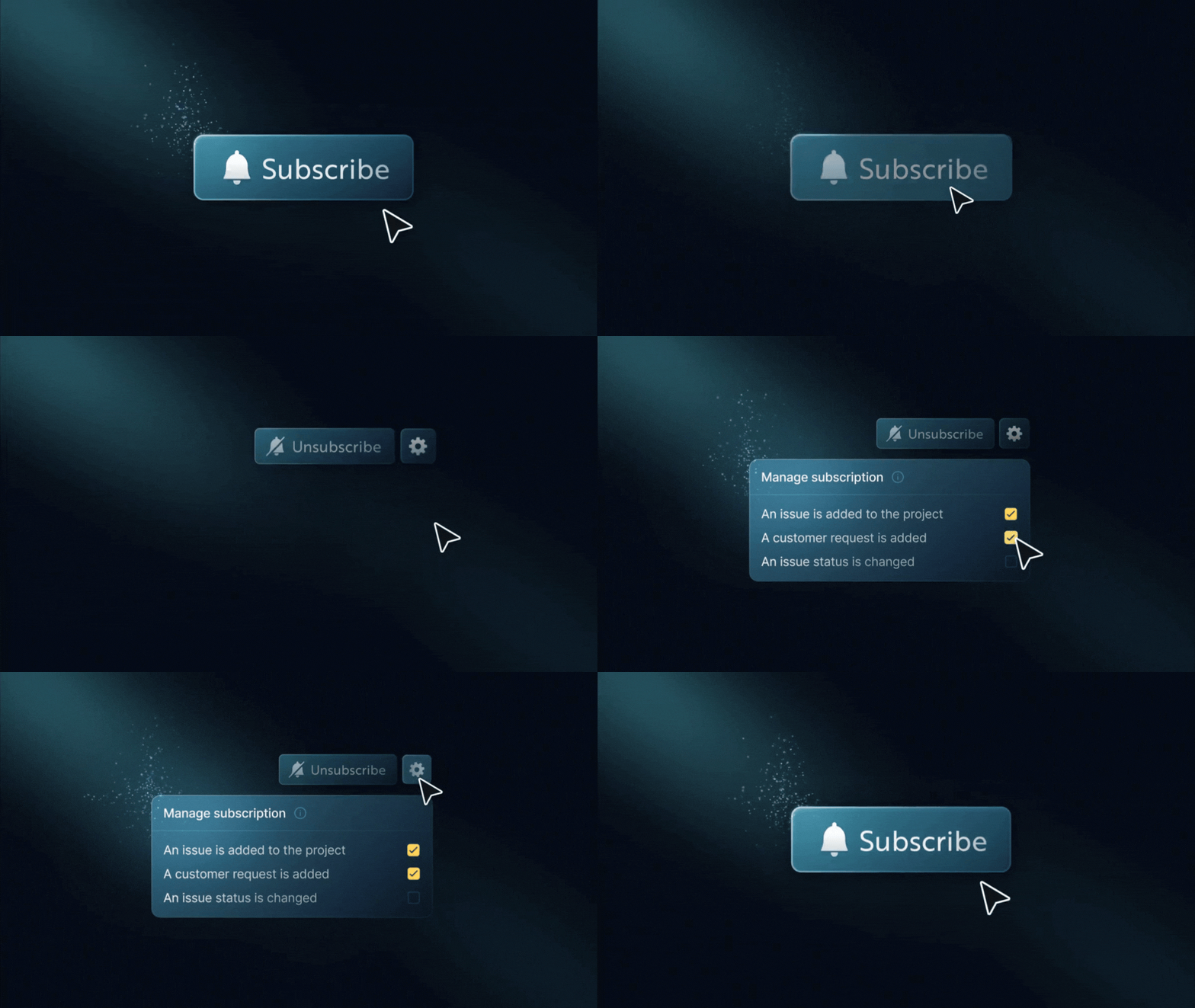
    States of <Subscription /> component

    The new <Subscription /> React component makes it easy to add subscription features to your app. You can use it for a simple “follow” button on a resource or a complete preferences view.

    Breakdown of the <Subscription /> component
    • Subscribe or unsubscribe to topics (e.g., projects, issues)
    • Enable or disable specific workflows within a topic
    • Support conditional delivery rules (e.g., owner-only, thresholds, filters)
    • Context-aware preferences: manage subscriptions differently across environments, tenants, or custom contexts using contextKeys
    • Multiple subscriptions per topic with different conditions
    • Fully customizable UI with theming, localization, and headless hooks
    • Works seamlessly with Inbox and existing workflow/global preferences

    Previously, subscribers could only control notifications at the workflow or channel level.

    Subscriptions now unlock:

    • Topic-level muting (e.g., turn off updates for project:43)
    • Context-scoped preferences: filter and match subscriptions by context, with behavior safely gated behind the feature flag
    • Advanced, structured preferences stored as JSON conditions
    • Contextual subscription management directly on entities like projects or tasks
    Read more

    Behind the scene, we've added robust support for contextKeys throughout the inbox and subscription modules. Sorted for consistency, validated across commands, and integrated into identifier logic for uniqueness.

    This lays the groundwork for granular notification preferences in multi-context environments while maintaining backward compatibility when context features are disabled.

    Learn more about <Subscription /> component

    Improvements (5)
    • Removed the default custom font URL from block-based email content. Now, it uses system default fonts instead.
    • Subscriber preferences now support context-aware binding. You can set and retrieve preferences for specific contexts, such as tenants or environments. If there's no context-specific value, it will use the global preferences instead.
    • Pagination preferences now persist across sessions. When you change how many items show per page, it saves your choice. The next time you visit, your selection will be restored.
    • Webhook messages now include workflow and step identifiers. Each webhook payload now includes workflowId and stepId. This gives you better context for tracking and routing events.
    • You can now configure digest lookback windows directly in the workflow editor. When digest mode is on, you’ll find new options for how far back to look. You can pick from quick presets: immediately, 5 minutes, or 30 minutes. You can also enter a custom value.
    Fixes (1)
    • Fixed the problem where duplicating a workflow didn't copy schema fields. This includes payloadSchema, validatePayload, and severity. These properties are now correctly preserved when workflows are duplicated.